CI workflow
This article walks through the process of running end-to-end tests against a matrix of Grafana versions.
Why run end-to-end tests against a matrix of Grafana versions
Due to Grafana’s dependency sharing mechanism, many plugin-related issues only emerge at runtime. For example, if a plugin invokes a function, component or class that is unavailable in the Grafana runtime environment, any page loading that part of the plugin will crash. These runtime-specific issues are beyond the scope of unit tests but can be effectively identified through end-to-end testing.
To maintain reliability and compatibility, plugin developers must regularly perform end-to-end tests across all supported Grafana versions. The e2e-versions GitHub Action simplifies this process by automatically resolving supported Grafana versions based on your plugin's grafanaDependency, while also including Grafana's main development branch. Integrating this Action into your CI workflows ensures your plugin remains stable and compatible with both older and newer versions of Grafana, giving you confidence in its functionality across versions."
The e2e-versions Action
The e2e-versions GitHub Action generates a matrix of Grafana image names and versions for use in end-to-end testing a Grafana plugin within a GitHub workflow. The Action supports two modes:
plugin-grafana-dependency:This mode resolves the most recentgrafana-devimage and returns all the latest patch releases of Grafana Enterprise since the version specified asgrafanaDependencyin theplugin.jsonfile. To prevent the initiation of too many jobs, the output is capped at 6 versions. This is the default mode.version-support-policy:In this mode, the action resolves versions based on Grafana's plugin compatibility support policy. It retrieves the latest patch release for each minor version within the current major Grafana version. Additionally, it includes the most recent release for the latest minor version of the previous major Grafana version.
For detailed information on configuring the inputs, visit the e2e-versions GitHub page.
Example workflows
All Grafana plugins created with grafana/create-plugin version 4.7.0 or later automatically include end-to-end tests against a Grafana version matrix as part of their ci.yml workflow. If your plugin was created with an earlier version, you can use the following example workflows to set up and run end-to-end tests with a Grafana version matrix in a separate GitHub workflow:
The following examples are generic and based any kind of plugin. Depending on the specifics of your plugin, you may need to modify or remove certain steps in the playwright-tests job before integrating them into your plugin’s workflow.
Plugins with backend workflow
- npm
- yarn
- pnpm
name: E2E tests
on:
  pull_request:
  schedule:
    - cron: '0 11 * * *' #Run e2e tests once a day at 11 UTC

permissions:
  contents: read

jobs:
  resolve-versions:
    name: Resolve Grafana images
    runs-on: ubuntu-latest
    timeout-minutes: 3
    outputs:
      matrix: ${{ steps.resolve-versions.outputs.matrix }}
    steps:
      - name: Checkout
        uses: actions/checkout@v4
      - name: Resolve Grafana E2E versions
        id: resolve-versions
        uses: grafana/plugin-actions/e2e-version@main

  playwright-tests:
    needs: resolve-versions
    timeout-minutes: 60
    strategy:
      fail-fast: false
      matrix:
        GRAFANA_IMAGE: ${{fromJson(needs.resolve-versions.outputs.matrix)}}
    name: e2e ${{ matrix.GRAFANA_IMAGE.name }}@${{ matrix.GRAFANA_IMAGE.VERSION }}
    runs-on: ubuntu-latest
    steps:
      - uses: actions/checkout@v4

      - name: Setup Node.js environment
        uses: actions/setup-node@v4
        with:
          node-version-file: .nvmrc

      - name: Install npm dependencies
        run: npm ci

      - name: Install Mage
        uses: magefile/mage-action@v3
        with:
          install-only: true

      - name: Build binaries
        run: mage -v build:linux

      - name: Build frontend
        run: npm run build

      - name: Install Playwright Browsers
        run: npx playwright install --with-deps

      - name: Start Grafana
        run: |
          docker compose pull
          GRAFANA_VERSION=${{ matrix.GRAFANA_IMAGE.VERSION }} GRAFANA_IMAGE=${{ matrix.GRAFANA_IMAGE.NAME }} docker compose up -d

      - name: Wait for grafana server
        uses: grafana/plugin-actions/wait-for-grafana@main

      - name: Run Playwright tests
        id: run-tests
        run: npx playwright test
name: E2E tests
on:
  pull_request:
  schedule:
    - cron: '0 11 * * *' #Run e2e tests once a day at 11 UTC

permissions:
  contents: read

jobs:
  resolve-versions:
    name: Resolve Grafana images
    runs-on: ubuntu-latest
    timeout-minutes: 3
    outputs:
      matrix: ${{ steps.resolve-versions.outputs.matrix }}
    steps:
      - name: Checkout
        uses: actions/checkout@v4
      - name: Resolve Grafana E2E versions
        id: resolve-versions
        uses: grafana/plugin-actions/e2e-version@main

  playwright-tests:
    needs: resolve-versions
    timeout-minutes: 60
    strategy:
      fail-fast: false
      matrix:
        GRAFANA_IMAGE: ${{fromJson(needs.resolve-versions.outputs.matrix)}}
    name: e2e ${{ matrix.GRAFANA_IMAGE.name }}@${{ matrix.GRAFANA_IMAGE.VERSION }}
    runs-on: ubuntu-latest
    steps:
      - uses: actions/checkout@v4

      - name: Setup Node.js environment
        uses: actions/setup-node@v4
        with:
          node-version-file: .nvmrc

      - name: Install yarn dependencies
        run: yarn install

      - name: Install Mage
        uses: magefile/mage-action@v3
        with:
          install-only: true

      - name: Build binaries
        run: mage -v build:linux

      - name: Build frontend
        run: yarn build

      - name: Install Playwright Browsers
        run: yarn playwright install --with-deps

      - name: Start Grafana
        run: |
          docker compose pull
          GRAFANA_VERSION=${{ matrix.GRAFANA_IMAGE.VERSION }} GRAFANA_IMAGE=${{ matrix.GRAFANA_IMAGE.NAME }} docker compose up -d

      - name: Wait for grafana server
        uses: grafana/plugin-actions/wait-for-grafana@main

      - name: Run Playwright tests
        id: run-tests
        run: yarn playwright test
name: E2E tests
on:
  pull_request:
  schedule:
    - cron: '0 11 * * *' #Run e2e tests once a day at 11 UTC

permissions:
  contents: read

jobs:
  resolve-versions:
    name: Resolve Grafana images
    runs-on: ubuntu-latest
    timeout-minutes: 3
    outputs:
      matrix: ${{ steps.resolve-versions.outputs.matrix }}
    steps:
      - name: Checkout
        uses: actions/checkout@v4
      - name: Resolve Grafana E2E versions
        id: resolve-versions
        uses: grafana/plugin-actions/e2e-version@main

  playwright-tests:
    needs: resolve-versions
    timeout-minutes: 60
    strategy:
      fail-fast: false
      matrix:
        GRAFANA_IMAGE: ${{fromJson(needs.resolve-versions.outputs.matrix)}}
    name: e2e ${{ matrix.GRAFANA_IMAGE.name }}@${{ matrix.GRAFANA_IMAGE.VERSION }}
    runs-on: ubuntu-latest
    steps:
      - uses: actions/checkout@v4

      - uses: pnpm/action-setup@v3

      - name: Setup Node.js environment
        uses: actions/setup-node@v4
        with:
          node-version-file: .nvmrc

      - name: Install pnpm dependencies
        run: pnpm install --frozen-lockfile

      - name: Install Mage
        uses: magefile/mage-action@v3
        with:
          install-only: true

      - name: Build binaries
        run: mage -v build:linux

      - name: Build frontend
        run: pnpm run build

      - name: Install Playwright Browsers
        run: pnpm playwright install --with-deps

      - name: Start Grafana
        run: |
          docker compose pull
          GRAFANA_VERSION=${{ matrix.GRAFANA_IMAGE.VERSION }} GRAFANA_IMAGE=${{ matrix.GRAFANA_IMAGE.NAME }} docker compose up -d

      - name: Wait for grafana server
        uses: grafana/plugin-actions/wait-for-grafana@main

      - name: Run Playwright tests
        id: run-tests
        run: pnpm playwright test
Frontend-only plugin workflow
- npm
- yarn
- pnpm
name: E2E tests
on:
  pull_request:
  schedule:
    - cron: '0 11 * * *' #Run e2e tests once a day at 11 UTC

permissions:
  contents: read

jobs:
  resolve-versions:
    name: Resolve Grafana images
    runs-on: ubuntu-latest
    timeout-minutes: 3
    outputs:
      matrix: ${{ steps.resolve-versions.outputs.matrix }}
    steps:
      - name: Checkout
        uses: actions/checkout@v4
      - name: Resolve Grafana E2E versions
        id: resolve-versions
        uses: grafana/plugin-actions/e2e-version@main

  playwright-tests:
    needs: resolve-versions
    timeout-minutes: 60
    strategy:
      fail-fast: false
      matrix:
        GRAFANA_IMAGE: ${{fromJson(needs.resolve-versions.outputs.matrix)}}
    name: e2e ${{ matrix.GRAFANA_IMAGE.name }}@${{ matrix.GRAFANA_IMAGE.VERSION }}
    runs-on: ubuntu-latest
    steps:
      - uses: actions/checkout@v4

      - name: Setup Node.js environment
        uses: actions/setup-node@v4
        with:
          node-version-file: .nvmrc

      - name: Install npm dependencies
        run: npm ci

      - name: Build frontend
        run: npm run build

      - name: Install Playwright Browsers
        run: npx playwright install --with-deps

      - name: Start Grafana
        run: |
          docker compose pull
          GRAFANA_VERSION=${{ matrix.GRAFANA_IMAGE.VERSION }} GRAFANA_IMAGE=${{ matrix.GRAFANA_IMAGE.NAME }} docker compose up -d

      - name: Wait for grafana server
        uses: grafana/plugin-actions/wait-for-grafana@main

      - name: Run Playwright tests
        id: run-tests
        run: npx playwright test
name: E2E tests
on:
  pull_request:
  schedule:
    - cron: '0 11 * * *' #Run e2e tests once a day at 11 UTC

permissions:
  contents: read

jobs:
  resolve-versions:
    name: Resolve Grafana images
    runs-on: ubuntu-latest
    timeout-minutes: 3
    outputs:
      matrix: ${{ steps.resolve-versions.outputs.matrix }}
    steps:
      - name: Checkout
        uses: actions/checkout@v4
      - name: Resolve Grafana E2E versions
        id: resolve-versions
        uses: grafana/plugin-actions/e2e-version@main

  playwright-tests:
    needs: resolve-versions
    timeout-minutes: 60
    strategy:
      fail-fast: false
      matrix:
        GRAFANA_IMAGE: ${{fromJson(needs.resolve-versions.outputs.matrix)}}
    name: e2e ${{ matrix.GRAFANA_IMAGE.name }}@${{ matrix.GRAFANA_IMAGE.VERSION }}
    runs-on: ubuntu-latest
    steps:
      - uses: actions/checkout@v4

      - name: Setup Node.js environment
        uses: actions/setup-node@v4
        with:
          node-version-file: .nvmrc

      - name: Install yarn dependencies
        run: yarn install

      - name: Build frontend
        run: yarn build

      - name: Install Playwright Browsers
        run: yarn playwright install --with-deps

      - name: Start Grafana
        run: |
          docker compose pull
          GRAFANA_VERSION=${{ matrix.GRAFANA_IMAGE.VERSION }} GRAFANA_IMAGE=${{ matrix.GRAFANA_IMAGE.NAME }} docker compose up -d

      - name: Wait for grafana server
        uses: grafana/plugin-actions/wait-for-grafana@main

      - name: Run Playwright tests
        id: run-tests
        run: yarn playwright test
name: E2E tests
on:
  pull_request:
  schedule:
    - cron: '0 11 * * *' #Run e2e tests once a day at 11 UTC

permissions:
  contents: read

jobs:
  resolve-versions:
    name: Resolve Grafana images
    runs-on: ubuntu-latest
    timeout-minutes: 3
    outputs:
      matrix: ${{ steps.resolve-versions.outputs.matrix }}
    steps:
      - name: Checkout
        uses: actions/checkout@v4
      - name: Resolve Grafana E2E versions
        id: resolve-versions
        uses: grafana/plugin-actions/e2e-version@main

  playwright-tests:
    needs: resolve-versions
    timeout-minutes: 60
    strategy:
      fail-fast: false
      matrix:
        GRAFANA_IMAGE: ${{fromJson(needs.resolve-versions.outputs.matrix)}}
    name: e2e ${{ matrix.GRAFANA_IMAGE.name }}@${{ matrix.GRAFANA_IMAGE.VERSION }}
    runs-on: ubuntu-latest
    steps:
      - uses: actions/checkout@v4

      - uses: pnpm/action-setup@v3

      - name: Setup Node.js environment
        uses: actions/setup-node@v4
        with:
          node-version-file: .nvmrc

      - name: Install pnpm dependencies
        run: pnpm install --frozen-lockfile

      - name: Build frontend
        run: pnpm run build

      - name: Install Playwright Browsers
        run: pnpm playwright install --with-deps

      - name: Start Grafana
        run: |
          docker compose pull
          GRAFANA_VERSION=${{ matrix.GRAFANA_IMAGE.VERSION }} GRAFANA_IMAGE=${{ matrix.GRAFANA_IMAGE.NAME }} docker compose up -d

      - name: Wait for grafana server
        uses: grafana/plugin-actions/wait-for-grafana@main

      - name: Run Playwright tests
        id: run-tests
        run: pnpm playwright test
Publish Playwright reports to GitHub Pages
The Playwright HTML report, along with the Trace Viewer, provides powerful tools for troubleshooting issues found during the execution of end-to-end test. This section explains how to deploy these reports to GitHub's static site hosting service GitHub Pages, making them immediately accessible for review after tests complete.
This guide is based on the example workflow provided earlier in this document.
Steps to enable report publishing
- Immediately following the step that executes the tests, add a step that uses the
upload-report-artifactsAction to upload the report and a test summary to GitHub artifacts.
- name: Run Playwright tests
  id: run-tests
  run: npx playwright test

- name: Upload e2e test summary
  uses: grafana/plugin-actions/playwright-gh-pages/upload-report-artifacts@main
  if: ${{ (always() && !cancelled()) }}
  with:
    test-outcome: ${{ steps.run-tests.outcome }}
- After the
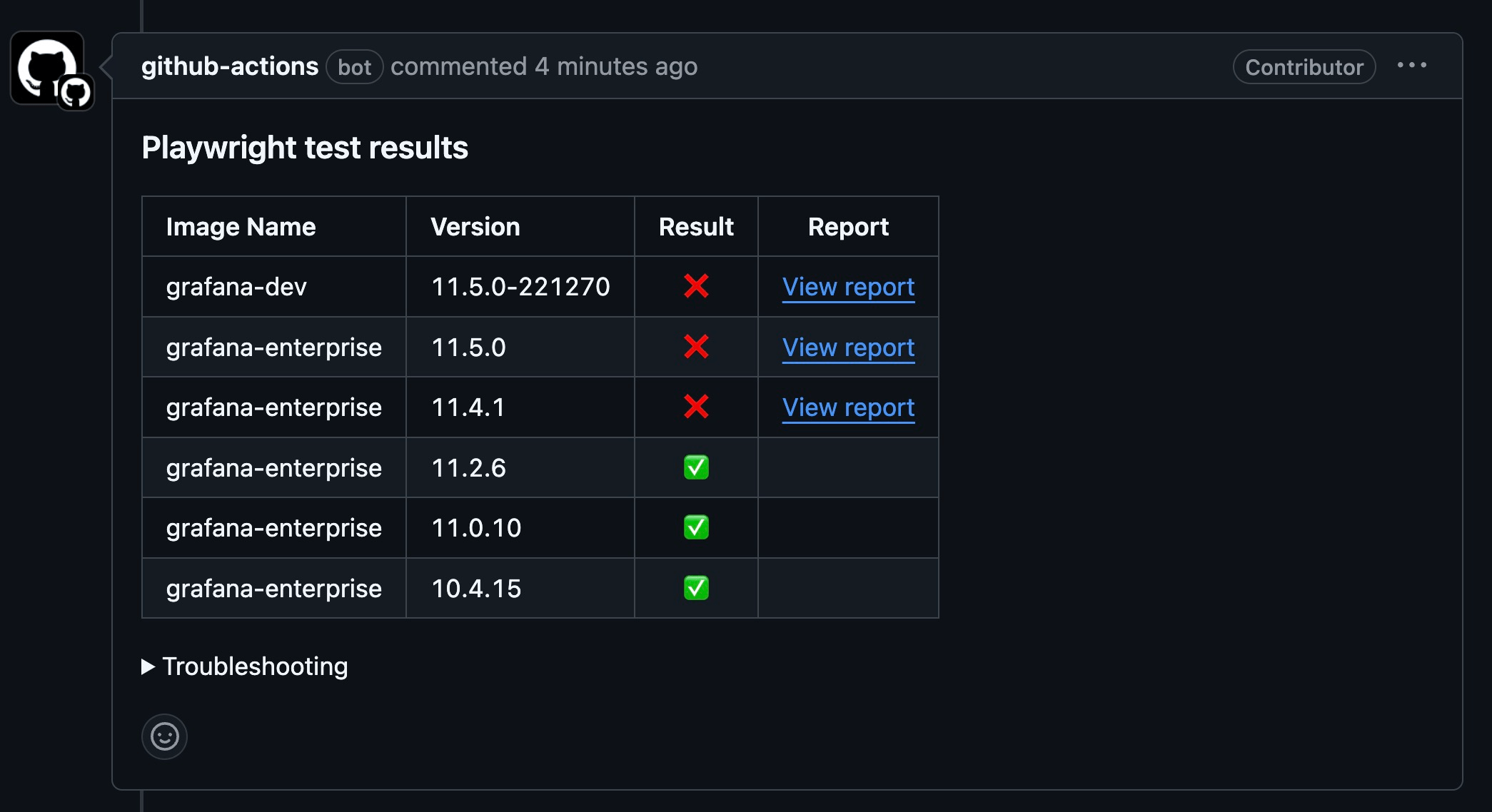
playwright-testsjob, add a new job to download the report artifacts, deploy them to GitHub Pages, and publish a PR comment summarizing the test results, including links to the reports.
publish-report:
  if: ${{ always() && !cancelled() && (github.event_name != 'pull_request' || github.event.pull_request.head.repo.fork == false) }}
  needs: [playwright-tests]
  runs-on: ubuntu-latest
  permissions:
    contents: write
    pull-requests: write
  steps:
    - uses: actions/checkout@v4
    - name: Publish report
      uses: grafana/plugin-actions/playwright-gh-pages/deploy-report-pages@main
      with:
        github-token: ${{ secrets.GITHUB_TOKEN }}
- Modify the workflow permissions so the test jobs stay read-only and only the report publishing job gets write access.
permissions:
  contents: read
If you disable PR comments with the pr-comment-summary input, you can also remove pull-requests: write from the publish-report job. The playwright-gh-pages actions do not use OIDC, so id-token: write is not required for report publishing.
- If GitHub Pages is not yet enabled for your repository, configure a source branch for deployment. Follow the detailed instructions here to set it up.
For additional configuration options and examples, refer to the playwright-gh-pages documentation.
Important considerations
- Public visibility: By default, GitHub Pages sites are publicly accessible on the Internet. Playwright reports can include screenshots, traces, HTML output, and internal URLs, so review the published content carefully before enabling report publishing for sensitive repositories.
- Enterprise access control: If you have a GitHub Enterprise account, you can configure access controls to restrict visibility. For details, refer to the GitHub documentation.
- Fork pull requests: Workflows triggered by
pull_requestfrom forks receive a read-onlyGITHUB_TOKEN. In that case the report publishing job may be unable to push the Pages branch or update PR comments. Avoid switching topull_request_targetjust to get a write-capable token unless you have separately reviewed the security implications of running untrusted code with elevated permissions. - Opt-in for new plugins: GitHub Pages publishing is not scaffolded by default for newly generated plugins. Add the upload step and
publish-reportjob only if you want public report hosting and accept the security trade-offs.
Report summary
The publish-report job adds a PR comment summarizing all the tests executed as part of the matrix. For tests that failed, the comment includes links to the GitHub Pages website, where the detailed reports can be browsed.