

Open in Grafana Cloud
Complete this learning path directly in your Grafana Cloud stack, or in the Grafana Play stack, with an interactive learning experience.
Configure Grafana IRM for incident response
Welcome to the Grafana learning path that shows you how to configure Grafana IRM (Incident Response Management) to manage incidents and organize on-call response. Grafana IRM is an observability native incident response solution that is embedded, side by side, with your existing monitoring and alerting workflows in Grafana Cloud.
Grafana IRM bridges the gap between monitoring and incident response by providing automated alert routing, escalation chains, on-call scheduling, and notification management. IRM differs from traditional incident management tools by being deeply integrated with your observability data, enabling faster incident response and resolution.
The following diagram represents how Grafana IRM helps you detect, respond to, and learn from incidents:
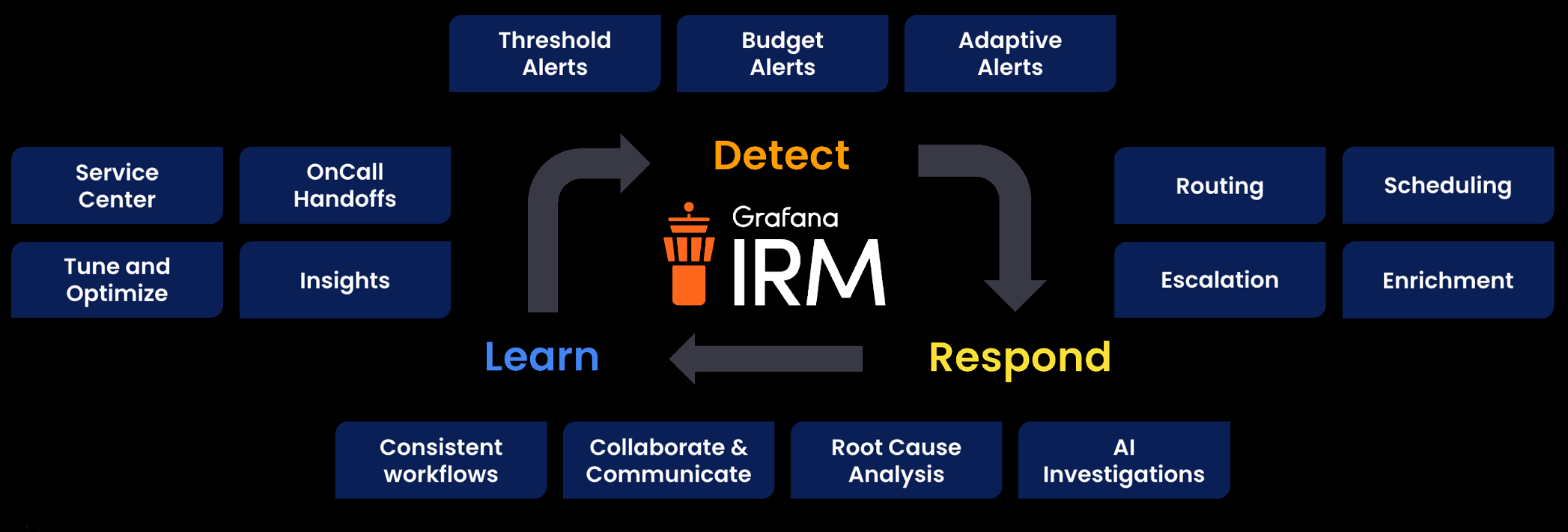
- Detect: Identify a problem within your system.
- Respond: Get the right people and processes in place to respond to the issue.
- Learn: Solve, communicate, and grow from resolving the issue.
Here’s what to expect
When you complete this path, you’ll be able to:
- Understand the value of Grafana IRM for incident response and on-call management
- Build a mental model of how IRM components work together
- Set up an on-call schedule with a rotation layer
- Create an escalation chain that routes alerts to the current on-call responder
- Connect Grafana Alerting as an alert source and link it to your escalation chain
- Connect an alert rule to IRM and test the complete configuration end to end
Before you begin
Before you configure Grafana IRM, ensure that you have:
- A Grafana Cloud account. To create an account, refer to Grafana Cloud.
- Admin or Editor permissions in your Grafana Cloud organization.
- At least one team defined in Grafana Cloud with members assigned.
- Basic familiarity with Grafana Alerting and how alerts are generated.
- At least one alert rule defined in Grafana Alerting. To create one, refer to the Create infrastructure alerts learning path.
Troubleshooting
If you get stuck, we’ve got your back! Where appropriate, troubleshooting information is just a click away.
More to explore
We understand you might want to explore other capabilities not strictly on this path. We’ll provide you opportunities where it makes sense.