

How Grafana products use telemetry signals
Grafana Cloud products use telemetry signals differently depending on their purpose, processing each signal in ways that support specific use cases.
Interactive guide
Use the interactive Grot Guide to explore which telemetry signals can meet your needs depending on your use case.

Product overview
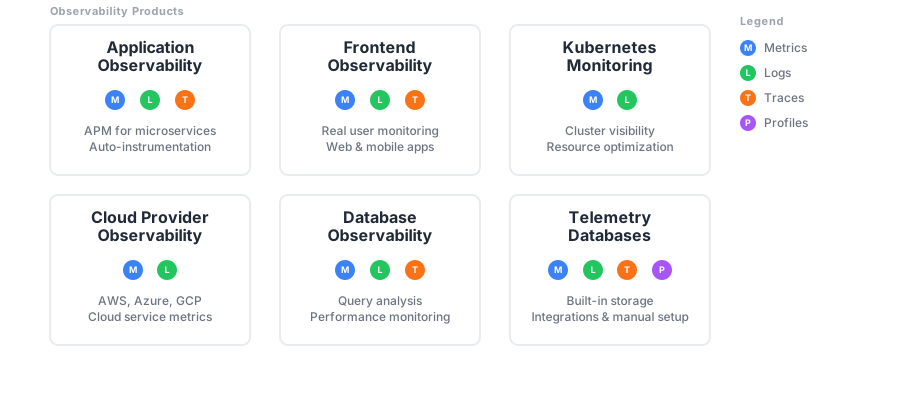
The following diagram shows how Grafana Cloud observability products map to telemetry signals. Each product collects and processes specific signals depending on its purpose.
Application Observability
Application Observability uses traces as its primary signal, then generates metrics and correlates logs.
Application Observability automatically instruments applications to collect traces, then derives metrics from those traces. Logs are linked to traces using trace IDs embedded in log entries.
For more information, refer to Application Observability.
Frontend Observability
Frontend Observability collects browser-side telemetry and links it to backend traces.
Frontend Observability instruments web and mobile applications to capture real user monitoring (RUM) data. Browser traces connect to backend traces using trace context propagation.
For more information, refer to Frontend Observability.
Kubernetes Monitoring
Kubernetes Monitoring focuses on infrastructure-level telemetry from Kubernetes clusters.
Kubernetes Monitoring collects metrics about cluster resources, Pod health, and container performance. You can integrate Kubernetes Monitoring with Application Observability to provide application-layer context for workloads running in the cluster.
For more information, refer to Kubernetes Monitoring.
Cloud Provider Observability
Cloud Provider Observability collects telemetry from cloud provider APIs.
Cloud Provider Observability pulls metrics and logs from cloud provider APIs rather than instrumenting applications directly. It supports AWS, Azure, and GCP services.
For more information, refer to Cloud Provider Observability.
Database Observability
Database Observability monitors database performance using metrics, logs, and optionally traces.
Database Observability collects telemetry from database systems to provide query-level insights and performance analysis. It supports MySQL, PostgreSQL, MongoDB, and other databases.
For more information, refer to Database Observability.
Send or collect telemetry signals
Grafana Cloud provides several ways to send or collect telemetry signals.
- Built-in telemetry signal databases: Grafana Cloud includes built-in databases for each telemetry signal. This section also includes information on using Grafana Alloy or the OpenTelemetry Collector.
- Grafana integrations: Preconfigured Grafana Alloy setups for common infrastructure components.
- Connect to data sources: Connect to external data sources.
Built-in telemetry signal databases
Grafana Cloud includes built-in databases for each telemetry signal: Cloud Metrics, Cloud Logs, Cloud Traces, and Cloud Profiles. These telemetry databases are managed services that receive, store, and let you query each type of signal. You send your telemetry signals to Grafana Cloud instead of running your own infrastructure.
Integrations
Integrations bundle Grafana Alloy configuration snippets, tailored Grafana dashboards, and alerting defaults for common observability targets like Linux hosts, Kubernetes clusters, and Nginx servers. With Grafana integrations, you can get a pre-configured Prometheus and Grafana-based observability stack up and running in minutes.
For more information, refer to Integrations.
Manual setup with telemetry signals
You can collect and send telemetry signals directly without using a preconfigured product.
With manual setup, you instrument applications using OpenTelemetry SDKs, configure collectors (Grafana Alloy or OpenTelemetry Collector), and build custom dashboards and alerting. This approach requires more configuration but provides maximum flexibility.
For more information, refer to Send data.
Use products together
Products can work together using shared labels and trace IDs, for example:
- Navigate from a Kubernetes Monitoring Pod view to Application Observability traces for services running in that Pod
- Link Frontend Observability browser traces to Application Observability backend traces
- Connect a slow trace span in Application Observability to a profile showing which function is slow
Data flows between products using correlation identifiers (trace IDs, service names, labels) that are consistent across signals.
Next steps
- Quick start to explore telemetry signals in Grafana Cloud
- Observability concepts to understand how signals work together


