
 Grafana Cloud
Monitor infrastructure
Kubernetes Monitoring
Optimize resource usage and efficiency
Grafana Cloud
Monitor infrastructure
Kubernetes Monitoring
Optimize resource usage and efficiencyOptimize resource usage and efficiency
Right-size CPU and memory across your Clusters so workloads stay stable and you don’t pay for capacity you don’t use. Underprovisioned workloads lag or fail, and overprovisioned ones quietly inflate costs.
At the Efficiency tab on Kubernetes Overview, you can answer the question: where is compute being paid for but not used? Use this data when you need to:
- Plan for capacity
- Find out why the scheduler is pending Pods despite Nodes appearing available
For the impact of inefficient sizing on spending , refer to Manage costs.
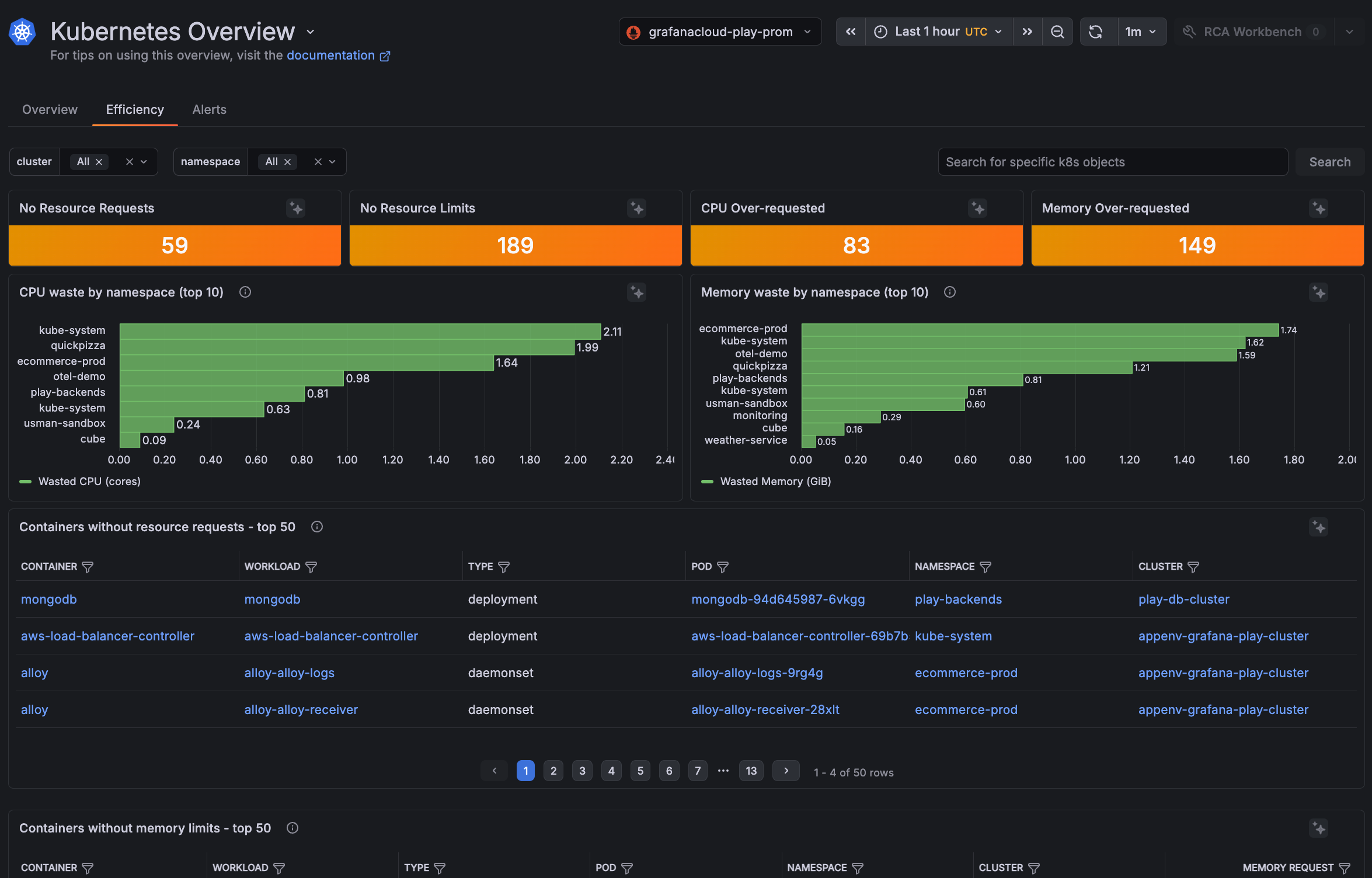
Adjust the time range and filter by cluster or namespace to focus on one team or Cluster, or leave the filters open to compare waste across your fleet. The page refreshes at 1-minute intervals.
Count of resource configuration gaps
The Efficiency tab shows counts of running containers with potential issues that can affect scheduling, Node stability, and capacity utilization.
Each count links to a top 50 list of the containers behind it, so you can see the container’s workload, Pod, namespace, and Cluster, and jump to details on the container.
List of Containers without resource requests
This list shows the top 50 containers with no CPU or memory request defined.
Missing CPU requests
A missing CPU request causes scheduling inefficiency and noisy-neighbor contention, but the workload still runs and the Node stays alive. It is best practice, however, to set CPU requests. Without CPU requests, the Kubernetes scheduler treats the container as needing zero resources. This leads to:
- Pods landing on Nodes that are already CPU-saturated, leading to poor bin-packing
- Resource contention
- Unexpected evictions under pressure
- Inaccurate capacity planning
Missing memory requests
When a Node runs out, the kernel kills processes. There’s no practice of throttling and waiting that CPU has. Requests are what protect your Pod from being the one that gets killed. A memory request affects whether your workload survives the next memory-pressure event.
List of Containers without memory limits
This list shows the top 50 containers with no memory limit defined. Memory limits are critical. Without them, a single runaway container can exhaust Node memory and trigger Node-level OOMKills that affect every Pod on the Node.
Set a memory limit on every container in the list. Even a generous limit is better than none, because it caps the blast radius of a runaway container to the container itself rather than the whole Node. Best practice is for memory requests and limits to be the same number.
Containers without CPU limits list
This list shows the top 50 containers with no CPU limit defined. CPU limits are more nuanced than the required memory limit. Many teams intentionally omit them because CPU throttling can hurt application latency more than the noisy-neighbor risk it prevents. Refer to CPU requests and limits for containers to learn more.
CPU over-requested containers list
This list shows the top 50 containers where the CPU request is much higher than actual usage. The scheduler reserves the full request on a Node, even when the container barely uses it. That reserved capacity blocks other Pods from being placed, and pushes you to add Nodes you don’t actually need. Right-size these requests to reclaim capacity on the hardware you already have.
Containers where the CPU request is significantly higher than actual usage, sorted by the largest gap. The Wasted CPU (cores) column is the difference between request and usage, color-coded by severity.
Oversized CPU requests mislead the scheduler, block other Pods from being placed, and raise infrastructure costs.
Memory over-requested containers list
This list shows the top 50 containers where the memory request is much higher than actual usage. The column Wasted Memory (GiB) is the difference between request and usage. Oversized memory requests:
- Reserve capacity on the Node that is never used. This affects bin-packing efficiency and raises infrastructure costs.
- Inflate per-Node reservations and quietly drives up cost.
Adjust these requests to reclaim capacity on the hardware you already have.
Top wasteful namespaces
The CPU waste by namespace (top 10) and Memory waste by namespace (top 10) panels show resource waste: the gap between what’s requested and what’s actually used. Use them to:
- Right-size workloads. Large numbers indicate requests are set well above actual consumption.
- Spot misconfigured apps. High waste often points to default or placeholder requests that were never tuned.
- Reduce costs. Overprovisioned namespaces tie up resources that could be reclaimed or used by other workloads.
To investigate any workload shown in the graph, click the graph line to jump to the namespace detail page.


