
Important: This documentation is about an older version. It's relevant only to the release noted, many of the features and functions have been updated or replaced. Please view the current version.

Grafana Mimir query-scheduler
The query-scheduler is stateless component that retains a queue of queries to execute, and distributes the workload to available queriers.
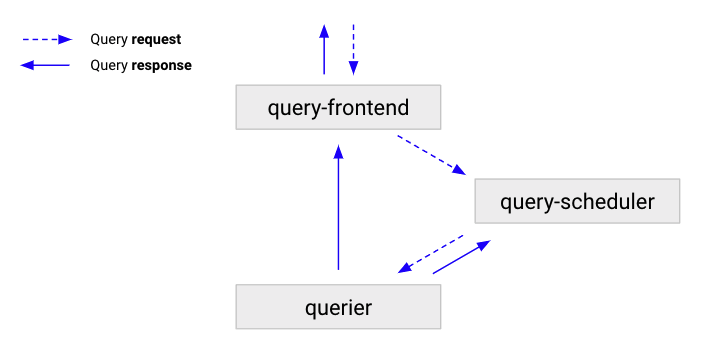
The following flow describes how a query moves through a Grafana Mimir cluster:
- The query-frontend receives queries, and then either splits and shards them, or serves them from the cache.
- The query-frontend enqueues the queries into a query-scheduler.
- The query-scheduler stores the queries in an in-memory queue where they wait for a querier to pick them up.
- Queriers pick up the queries, and executes them.
- The querier sends results back to query-frontend, which then forwards the results to the client.
Benefits of using the query-scheduler
Query-scheduler enables the scaling of query-frontends by moving queuing of requests to a separate component. The query-scheduler prevents queries that only require ingesters from being affected by degradation of store-gateways and vice versa. The query-scheduler ensures tenant fairness using a simple round-robin between all tenants with active queries.
Configuration
Query-frontends and queriers need to discover the addresses of query-scheduler instances. The query-scheduler supports two service discovery mechanisms:
- DNS-based service discovery
- Ring-based service discovery
DNS-based service discovery
To use the query-scheduler with DNS-based service discovery, configure the query-frontends and queriers to connect to the query-scheduler:
- Query-frontend:
-query-frontend.scheduler-address - Querier:
-querier.scheduler-address
Note
The configured query-scheduler address should be in the
host:portformat.If multiple query-schedulers are running, the host should be a DNS name resolving to all query-scheduler instances.
Ring-based service discovery
To use the query-scheduler with ring-based service discovery, configure the query-schedulers to join their hash ring, and the query-frontends and queriers to discover query-scheduler instances via the ring:
- Configure the hash ring for the query-scheduler.
- Set
-query-scheduler.service-discovery-mode=ring(or its respective YAML configuration parameter) to query-scheduler, query-frontend and querier. - Set the
-query-scheduler.ring.*flags (or their respective YAML configuration parameters) to query-scheduler, query-frontend and querier.
Migrate from DNS-based to ring-based service discovery
To migrate the query-scheduler from DNS-based service discovery to ring-based service discovery, perform the following steps:
Configure the query-scheduler instances to join a ring:
-query-scheduler.service-discovery-mode=ring

# Configure the query-scheduler ring backend (e.g. "memberlist").
-query-scheduler.ring.store=<backend>

# If the configured <backend> is "memberlist", then ensure memberlist is configured for the query-scheduler.
-memberlist.join=<same as other Mimir components>

# If the configured <backend> is "consul" or "etcd", then set their backend configuration
# for the query-scheduler ring:
# - Consul: -query-scheduler.ring.consul.*
# - Ecd:    -query-scheduler.ring.etcd.*
Wait until the query-scheduler instances have completed rolling out.
Ensure the changes have been successfully applied; open the query-scheduler ring status page and ensure all query-scheduler instances are registered to the ring. At this point, queriers and query-frontend are still discovering query-schedulers via DNS.
Configure query-frontend and querier instances to discover query-schedulers via the ring:
-query-scheduler.service-discovery-mode=ring

# Remove the DNS-based service discovery configuration:
# -query-frontend.scheduler-address

# Configure the query-scheduler ring backend (e.g. "memberlist").
-query-scheduler.ring.store=<backend>

# If the configured <backend> is "memberlist", then ensure memberlist is configured for the query-scheduler.
-memberlist.join=<same as other Mimir components>

# If the configured <backend> is "consul" or "etcd", then set their backend configuration
# for the query-scheduler ring:
# - Consul: -query-scheduler.ring.consul.*
# - Ecd:    -query-scheduler.ring.etcd.*
Note
If you deploy your Mimir cluster with Jsonnet, refer to Migrate query-scheduler from DNS-based to ring-based service discovery.
Operational considerations
For high-availability, run two query-scheduler replicas.
If you’re running a Grafana Mimir cluster with a very high query throughput, you can add more query-scheduler replicas.
If you scale the query-scheduler, ensure that the number of replicas you add is less or equal than the configured -querier.max-concurrent.


